MMORPG, Crafting, RPG
Developed by Mainframe Industries in Unreal Engine 5
My Contributions with Shipwright Studios
I joined with Shipwright Studios as a Gameplay Engineer. I started out as the primary engineer for supporting SFX and VFX features because the audio and VFX designers did not have engineering support for a long time, but quickly finished their requests and moved onto Combat and Animations. I became a primary engineer for animations for a period as well, and then shifted into supporting the homestead and civilization systems in the end.
Impact System
The impacts of the game had many issue when it came to visual effects. The blood particles would come out of an area that does not align with the hit impact. The impacts did not have information as to what type of impact is being hit, nor the vectors necessary for determining the direction and normal of the impact.
I started with focusing on the blood particle system. What existed before my changes was a red blood effect at around the neck area of the NPC. This can be seen in the video to the right. The new effect that comes out of the NPC in the direction of the sword swing is the improvement made after my changes.
To get more accurate hit detection, I used the direction of the sword swing to create the plane of motion that the sword is traveling in. I then find the closest point on this plane to the NPC. Then this plane point is used to get the closest point on the NPC's mesh.
To get more accurate hit detection, I used the direction of the sword swing to create the plane of motion that the sword is traveling in. I then find the closest point on this plane to the NPC. Then this plane point is used to get the closest point on the NPC's mesh.
The reason for this approach is due to the limitation of when damage is applied. In a swing, a cone of damage is applied all in one frame. Due to this, we need a visual representation to match when the damage triggers, but our sword can be at any point in the cone when the damage goes out. This is why we do closes point comparisons rather than utilizing raycasts or colliders, as we wouldn't be sure what direction to do the raycast (sword being before or after the NPC when damage applied), and if the collider is even overlapping at the damage frame.
My next area of focus was to apply the impact system onto footsteps. The final result can be seen in the video demo to the right. What existed before was no footprint, and only a dust, grass, or water particle effect on each footstep based on the impact. This was due to the impact only receiving surface and location information.
With the impact data asset, the designer now has information about the impact direction, the normal to the surface, along with custom tagging to surpass the 30 surface types limitation set by unreal engine.
Impact Data Asset
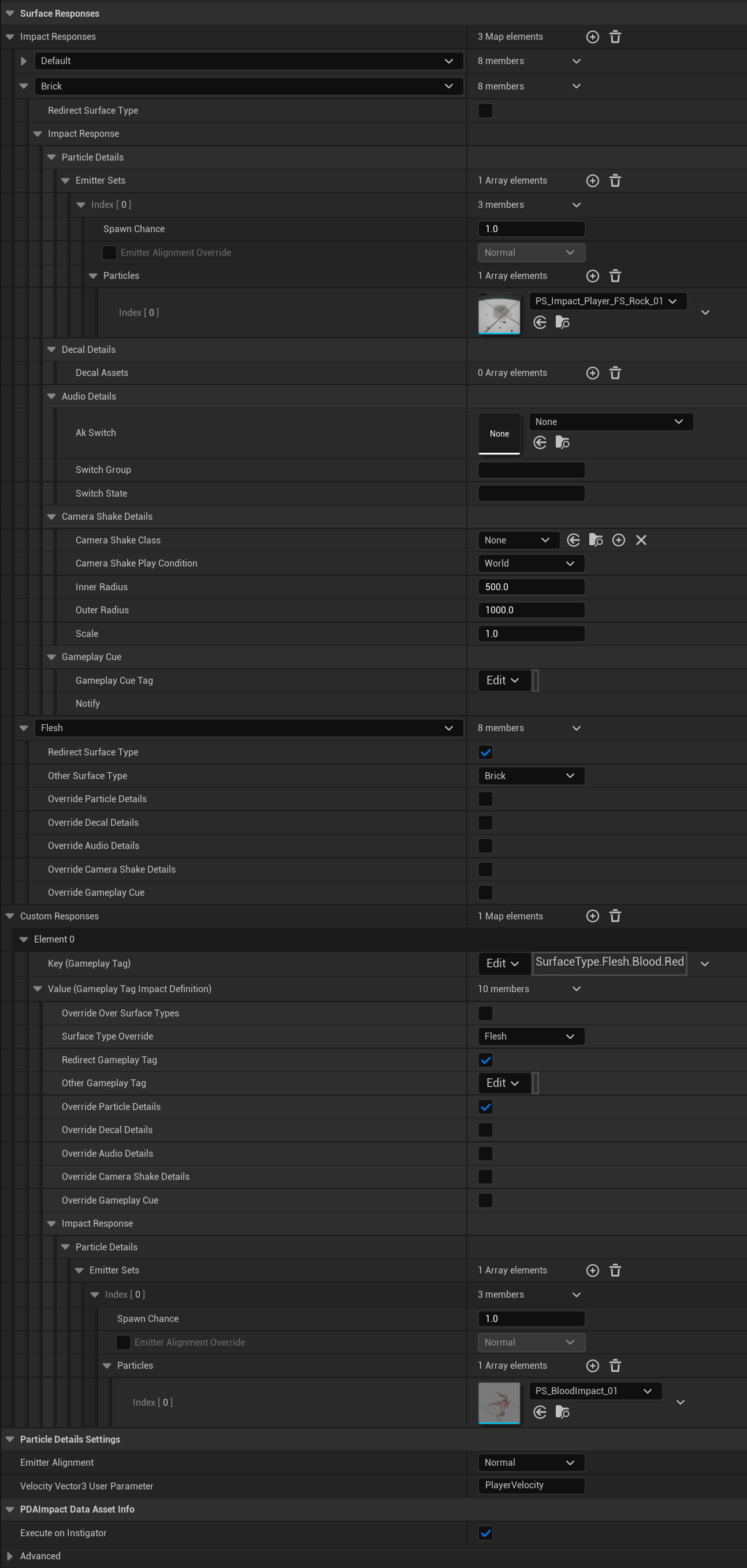
Looking into the impact data asset, we see this image to the right. I will try to quickly highlight the structure of this data. Starting from the top.
We have a map of Impact Responses for each of the existing surface types that exist. In each surface type, we can choose to Redirect the Surface Type to do the same features as a different surface type if we wish. If we do not redirect, then the surface type has Particle, Decal, Audio, Camera Shake, and Gameplay Cue details.
Each of these are pretty given so for the video example above, particle is the water splash, decal is the footprint it leaves behind, audio is the splash sound, camera shake is motion of walking, and gameplay cue is an extra Cue that can be added for additional blueprint functionality if the existing functionality is not sufficient.
Note decal details points to another data asset that I created that is as robust as this one. It had a lot more math for figuring out the normal to the surface, and rotating the decal to be forward facing from the impact direction. Euler angles were not enough for this so Quaternion rotations were needed to make rotations work for adjusting the alignment and rotations for particles and decals. However trying to give a screenshot of that work as well would make this longer than it already is! (But please feel free to ask me about more details of my work :)
Note decal details points to another data asset that I created that is as robust as this one. It had a lot more math for figuring out the normal to the surface, and rotating the decal to be forward facing from the impact direction. Euler angles were not enough for this so Quaternion rotations were needed to make rotations work for adjusting the alignment and rotations for particles and decals. However trying to give a screenshot of that work as well would make this longer than it already is! (But please feel free to ask me about more details of my work :)
If we choose to redirect the surface type to a different one, then it will use the functionality set up in the other other surface type. In the example image, Flesh would do the same effects as Brick. An option to override each detail is also available if the user wishes to only copy certain parts of a different surface type and not all, so the same properties don't have to be set over and over again.
In our Custom Responses list, we see that key is a gameplay tag. This is a tag that the NPC has to represent a custom surface type (so we can surpass the 30 surface type limitation). This will override an existing surface type, unless "Override Over Surface Types" is selected, in which case it will use this impact details regardless if an existing surface type is found ("Flesh" in our example to the right). In the custom tag example, we also override the particle Details, and can see underneath that we want to play the blood impact particle system instead of the Rock effect this would be redirected to.
The custom responses are necessary as we have many different NPCs with many different types of Flesh. There are monsters with black blood, or monsters made of flies as seen in the first video demo.
Combat & Animation
The hit reactions needed an angle to react based on the direction of the hit as well. As we did have world direction of the hit, we needed to convert the direction to local character directions so we know which direction animation should be play (i.e. we are facing North hitting an NPC facing East in a forward direction, so the NPC would react left).
I went through and rotated each world hit direction into local character directions so the NPCs can react in the correct local direction based on the hit. This direction is now more intuitive for the designer to overwrite with with a simple angle if they chose to do so. Otherwise the direction is automatically converted based on the hit direction. An extra toggle was also added to account for if the hit should just always be away from the instigator, as for a ground hit for example, we would not want the downward direction to result in unexpected directions.
I went through and rotated each world hit direction into local character directions so the NPCs can react in the correct local direction based on the hit. This direction is now more intuitive for the designer to overwrite with with a simple angle if they chose to do so. Otherwise the direction is automatically converted based on the hit direction. An extra toggle was also added to account for if the hit should just always be away from the instigator, as for a ground hit for example, we would not want the downward direction to result in unexpected directions.
In the video on the right, we can see that the orange debug line shows the hit react direction, parallel with the ground, while the light blue line shows the impact direction.
I did some camera smoothing work, so there is an adjustable interpolation for camera lag with separate XY settings, as well as customization for the spring arm component for the interpolation of zooming back out, and the camera snapping forward when colliding against objects.
There was also some animation work for IK weapon placement on for the character on the weapon that needed to be activated on certain key frames to have the appearance of holding the weapon correctly when it is being swung around. This involved adding some code logic into the control rig and animation sequences.
Homestead and Civilization
There was work to have mesh interpolation and rotations on props. The video on the right shows the cooking of a spit roast by updating the color in the material, along with logic that only rotates when things are cooking, or stops rotating when there is food to be collected. This way there is clear feedback for the player on how and when to interact with certain props.
I have also worked on the grace and miracle system. It allows the player to convert their extra abundance of gold into blessings and buffs for gathering and other utilities. This is integrated through the gameplay ability system (GAS) and in the form of spell abilities with effects. I recall a big challenge was tracking server-client-account-wide timers for cooldowns as this is to be able to be utilized once daily or other limitations like that.
I also made modifications to the loot table to buff certain numbers to increase yield, so a system was written around that to interact with gathering blessings. The loot system was very interesting as there are certain pool and samples of certain drops based on conditions, and I was able to go through and add ways "code" more logic for the loot tables in spreadsheets.
Other Contributions
SFX tasks I've worked on include audio events for building, construction, spells, combat, ambience, music, footsteps, NPC behaviors, UI interactions, and everything that makes sound in the game. Refactors involving audio component pooling, easier design for content drops, replication of data to proper clients/servers, and data driven designs were also done while implementing new features.
VFX tasks involve particle events for combat, movement (falling & swimming), spells, interactions, and everything that uses particle effects in the game. Optimizations were done to reduce the amount of spawned components to handle the particle effects. Reduction in ray and line traces were also done to increase performance of the game.
While managing the ambience of the game, I also did a major refactor to the biome system. The system represents the map on a 2D texture and passes the data through color channels for each biome based on map location as well as how deep in the biome a location is. I fixed the system and used parenting to reduce duplicate code. While I was working on this, I also created volumes that allows for easier custom biome override and handling of multiple biomes on a single location on the 2D plane (for change based on altitude).