This video represents the gameplay demo created after our vertical slice as a pitch to investors.
Immersive Simulation, RPG, Multiplayer
Developed by Otherside Entertainment in Unreal Engine 5
My Contributions with Shipwright Studios
I am joining this project as an AI Engineer, once again with Shipwright Studios. Shipwright makes up a majority of the engineering team on this project and I was fortunate to be able to contribute to the AI team for this project.
Path Following and Avoidance
The biggest initial issue we had with pathfollowing were AI agents falling off of the NavMesh or colliding into each other thus causing them to get stuck and not move. I will highlight the problems we encountered and iterative steps we took to resolve each issue.
Reciprocal Velocity Obstacles (RVO)
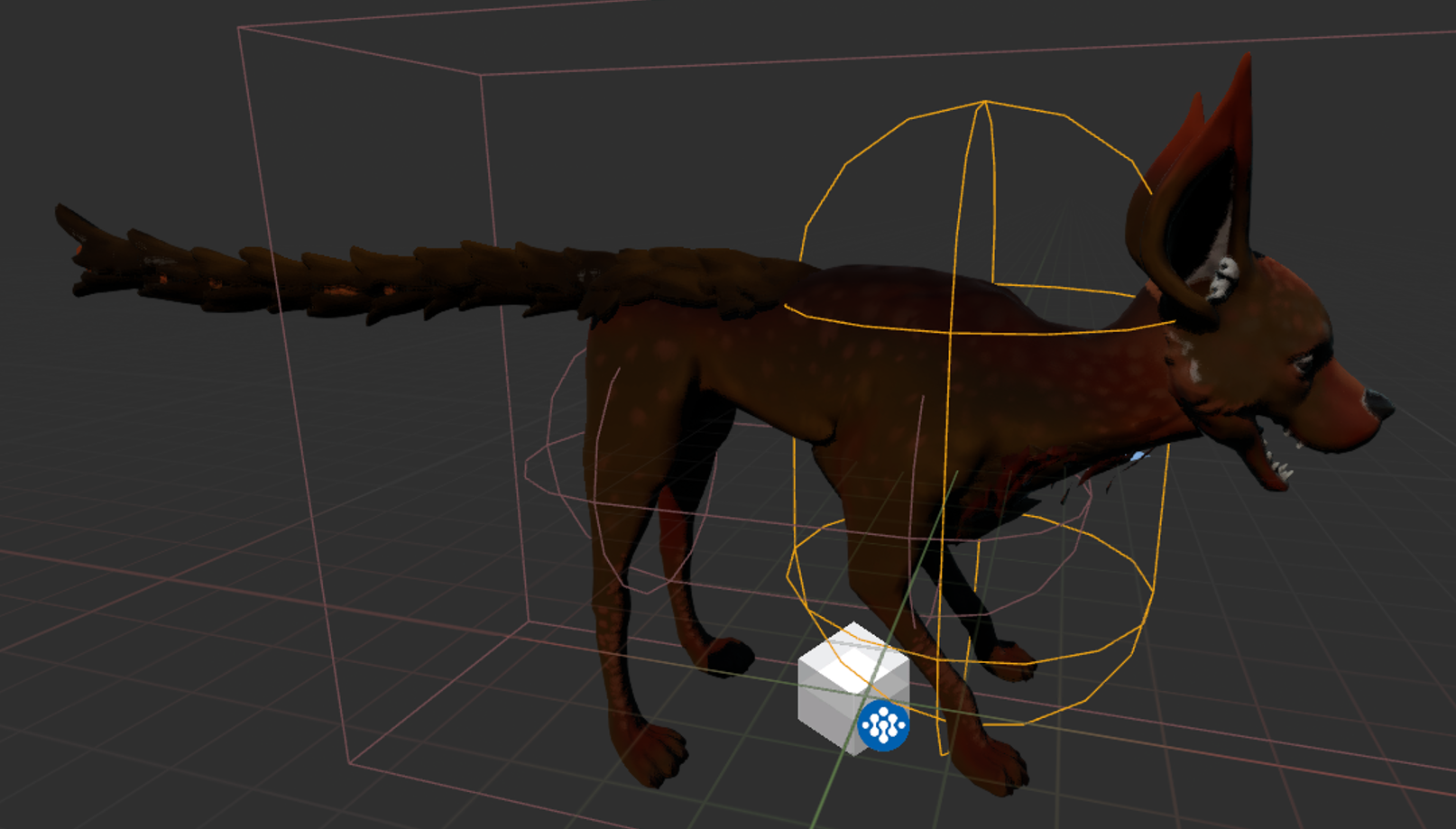
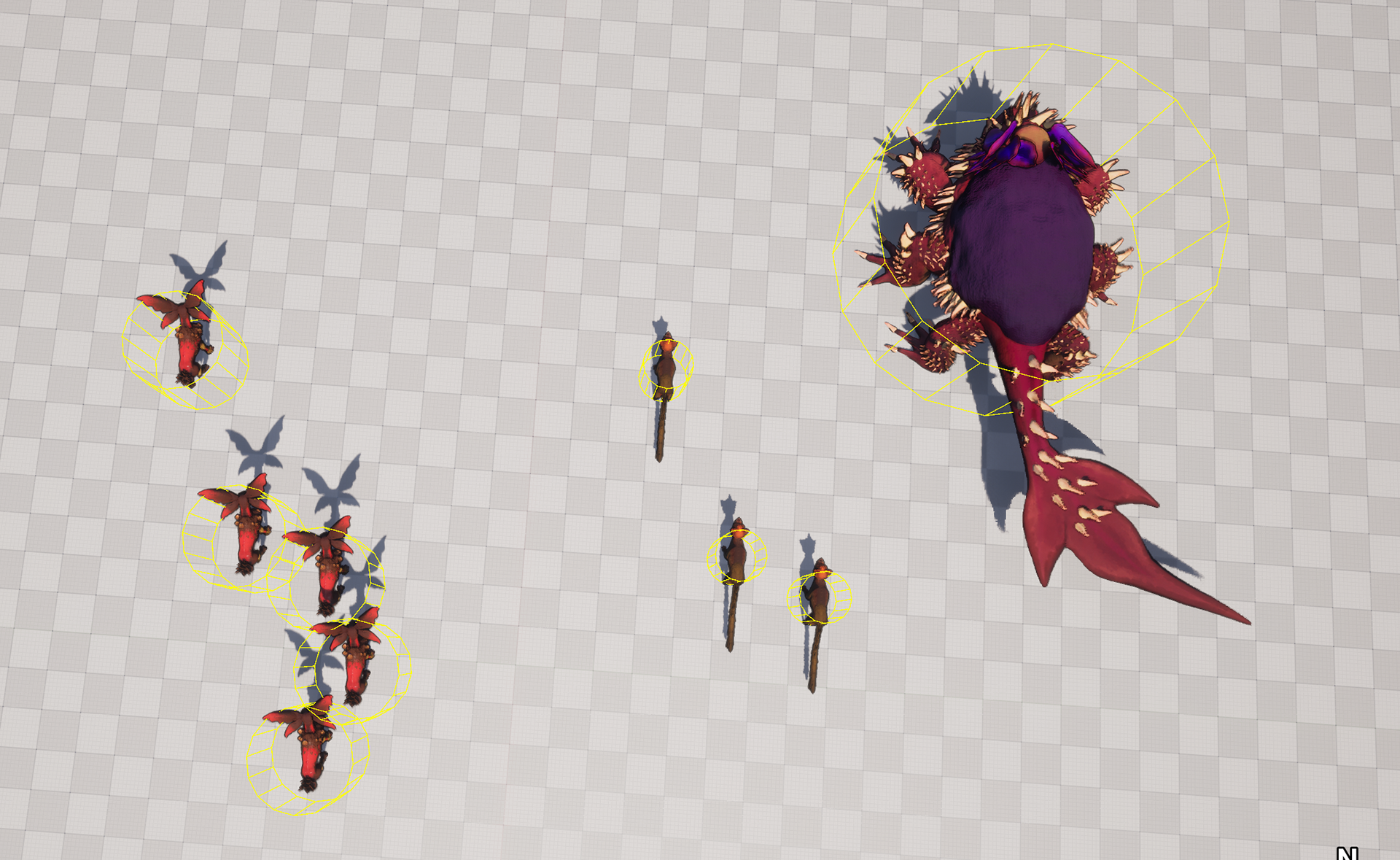
One of the issues we had was that we were using RVO on the main capsule collider that represents the front 2 legs of an animal. Thus even when we expand the radius, it is still offset from the center of the animal. Through some overrides, I added in an override for the offset and radius of the RVO circle per agent, so we can better draw a circle around each agent for RVO to handle the avoidance. The first image shows how the collider wraps only the front hind legs, and the second image shows the RVO circle wrapping the animals after my change to avoid each other.
Clothoid Path Following & Collision
There was already a clothoid path following implementation when I joined the project. However, it behaved weirdly as we are seeing the agents slam into a wall or fall off a nav mesh after a turn. After learning the algorithm used, I discovered it gets too far off the path, recalculates the clothoid, but then a segments use the current delayed rotation to reset the turn again, causing an extra jerk in the opposite direction after the turn is nearing completion. I both ensured the turn does not hard set the rotation to prevent jitter, and simplified the S segment turns to ensure smooth turning in the path. Video on the right showcases the turns after the fix and how RVO performs after the fix above.
A little bit unrelated but we also had a funny issue with animals being launched. The issue was simply a jump off value being pretty high, which I set to 0 in the video below.
Nav Area as a Solution Attempt
The RVO solution still causes visual issues on avoidance. If you look closely at the avoidance resolution, it causes foot sliding and a large bubble of personal space around each agent. This later becomes very obvious when we have herds of agents move around each other in close proximity. The sliding looks very unnatrual and we needed a better solution. We first attempted to to drop a NavArea around the chimera when they stop moving, but it both throttled the NavMesh generation and was very delayed as seen in the video on the right.
Clothoid smoothing also still has a small percent of failure cases as it does not account for the outside wall of wide turns. It was resolved with doing tighter turns, but then the smoothing was so little, clothoid seems to be overkill and we could have just resolved it with animations. All these issues started pointing us towards using the Crowd Manager, but then that has the issue of it only supporting one nav mesh, when we utilize multiple dynamic nav meshes for our multi-sized agents.
Multi Crowd Manager
The issues above pointed us towards the Multi-Crowd Manager. This was a custom solution to run a dtCrowd (Crowd Manager is just a wrapper for dtCrowd), per agent. The failure point of this approach is that agents of the same size can avoid each other, but multi sized agents are unable to avoid each other. However we decided this was fine as when an agent of different sizes approach one another, the interaction behaviors naturally repel or play off of one another (such as flee or attack, and attack results in a gameplay response anyway). This was our final avoidance solution to fit into the design and scenarios our game presented. Video on the right shows agents of different sizes avoiding each other in the same level.
Navigation Meshes
Our game used multiple dynamic nav meshes, one for each size/type of agent. We then have nav invokers on certain actors that trigger when to generate nav meshes. Many adjustments to the navigation meshes were made.
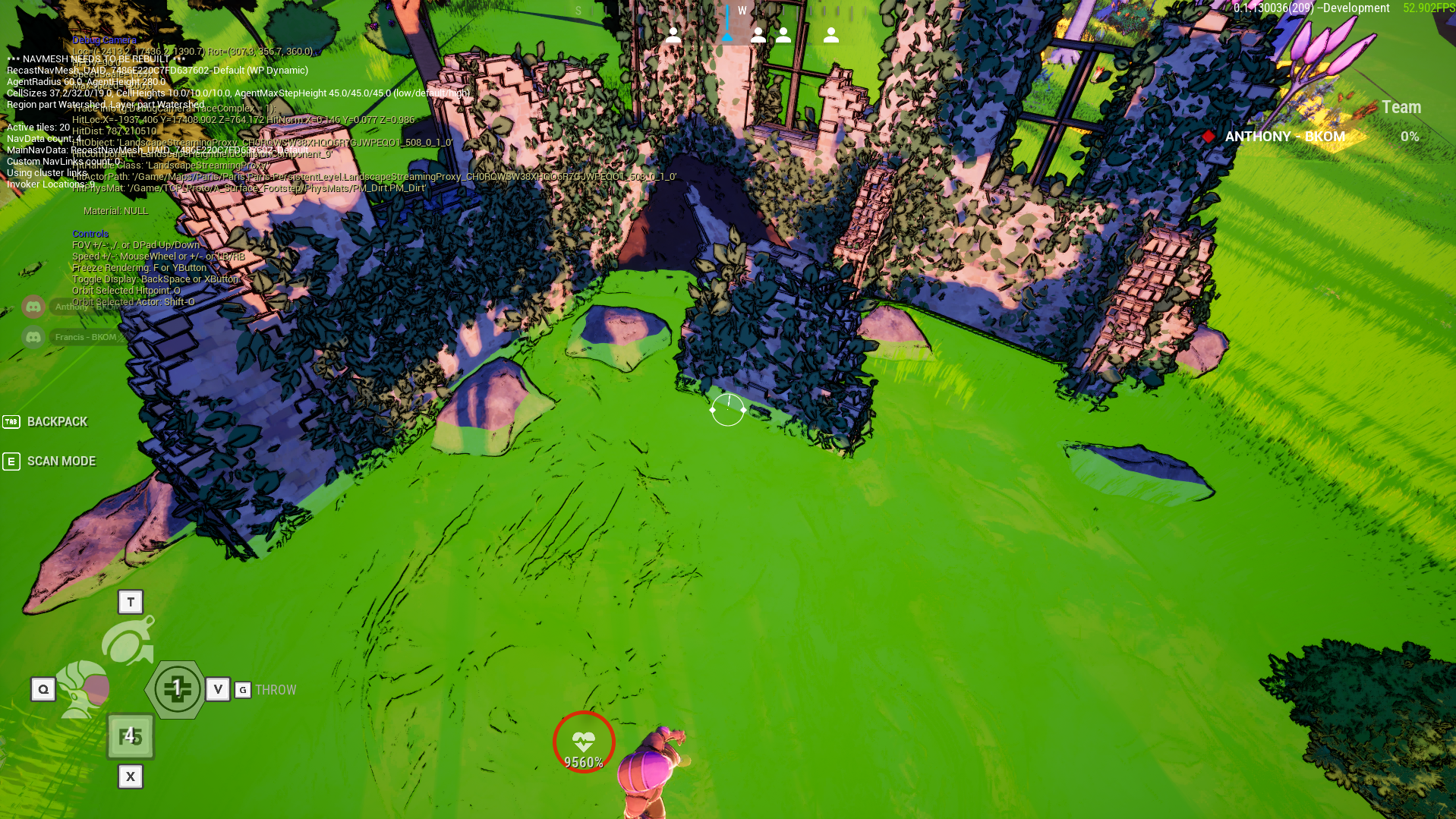
One large issue we had was that streamed in level instance actors did not update navigation despite being nav relevant. The image on the right shows how the walls are generated without cutting into the NavMesh. After digging in the nav mesh generation code, I discovered that Unreal Engine was not handling our case of multi-dynamic nav mesh updating, and made the adjustments to handle that accordingly.
Another issue was animals avoiding hazard areas. We had hazardous areas that agents should avoid, but the agents also should be immune to certain areas. I solved this issue by using nav filters to override the cost of certain areas based on gameplay tags on the AI agent.
State Trees & Environment Query System (EQS)
I was working closely with the AI designer by extending functionality in Unreal Engine 5's State Tree system to support more complex behavior authoring. This includes modifications in state tree evaluators, tasks, state tree conditions, and any state tree related components.
Move to Flee Behavior
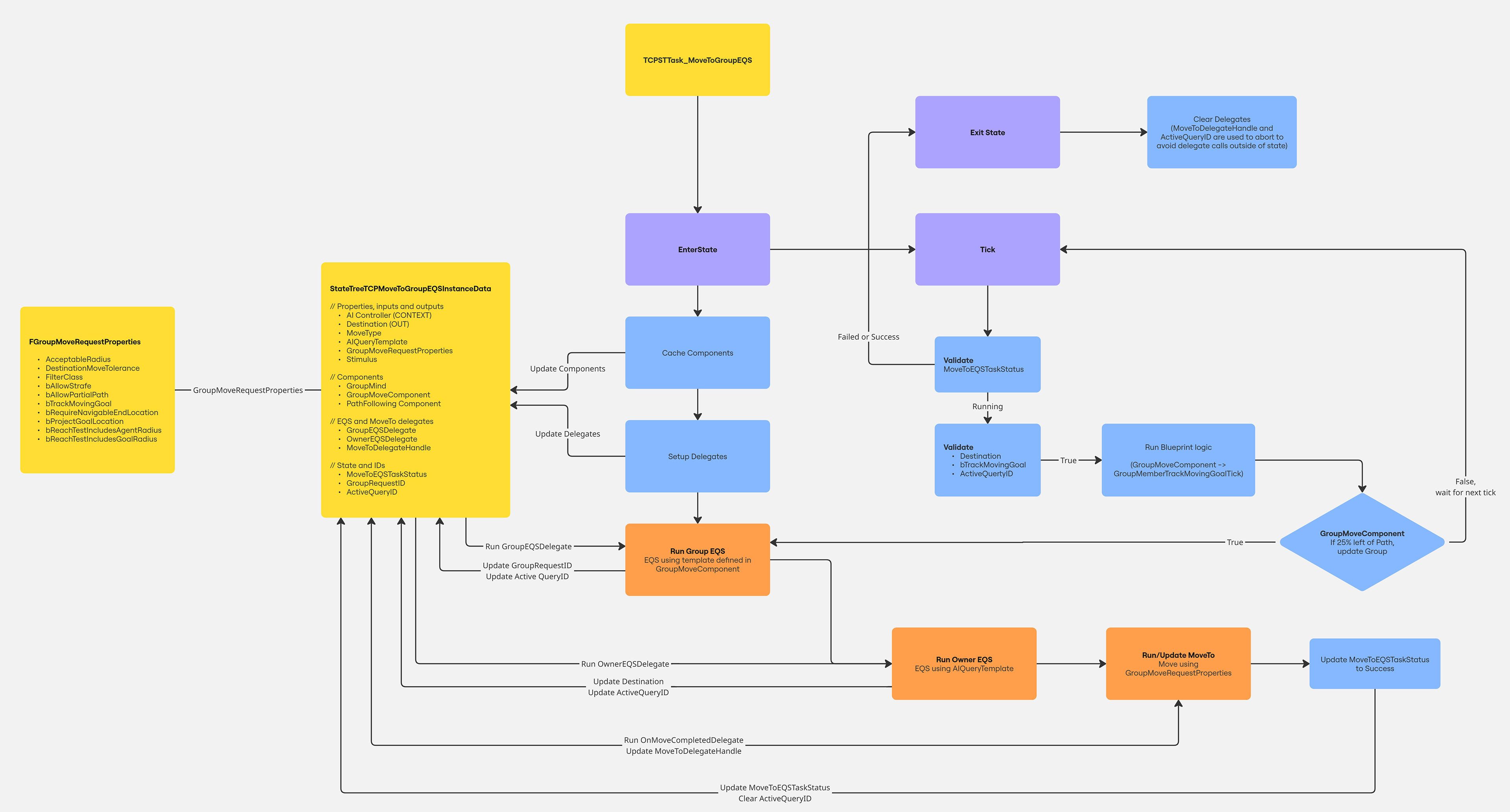
I have created endpoints that help streamline tons of synchronization logic. An example of this is process of running an EQS query for the group it belongs to, using the resulting location to run another query for the individual character to move to, and properly rerunning these queries while updating the move smoothly without interruptions in movement, or massive hits on performance. The image on the right shows the flowchart for this behavior.
Centralized Tick
We utilize the significance manager to reduce the amount of ticks of AI components but State Trees seemed to run on their own tick system. After investigation, I found the reason for this was for more controlled ticks within the tree for transitions. I was able to successfully limit the state tree to a global tick with a MAX(GlobalTick, LocalTick) to respect both the local system ticks and our significance manager tick.
Sensory Systems
Improvements to sensory systems such as threat assessment, detection, and perception were also worked on.
Threat Assessment & Detection
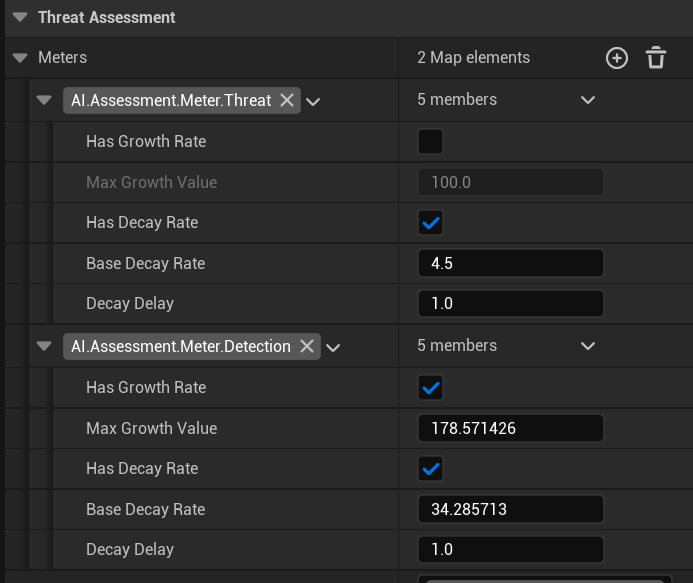
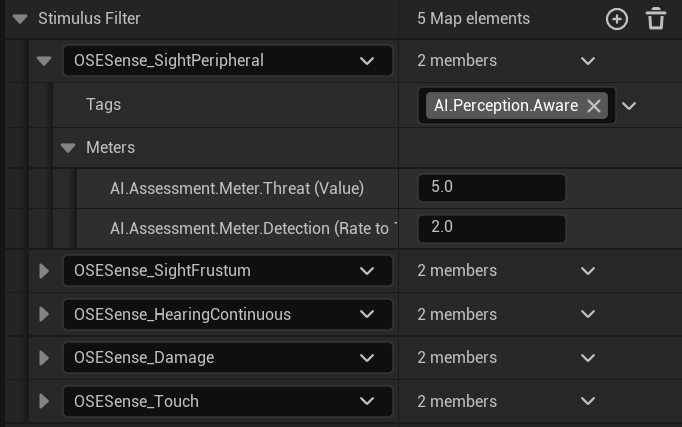
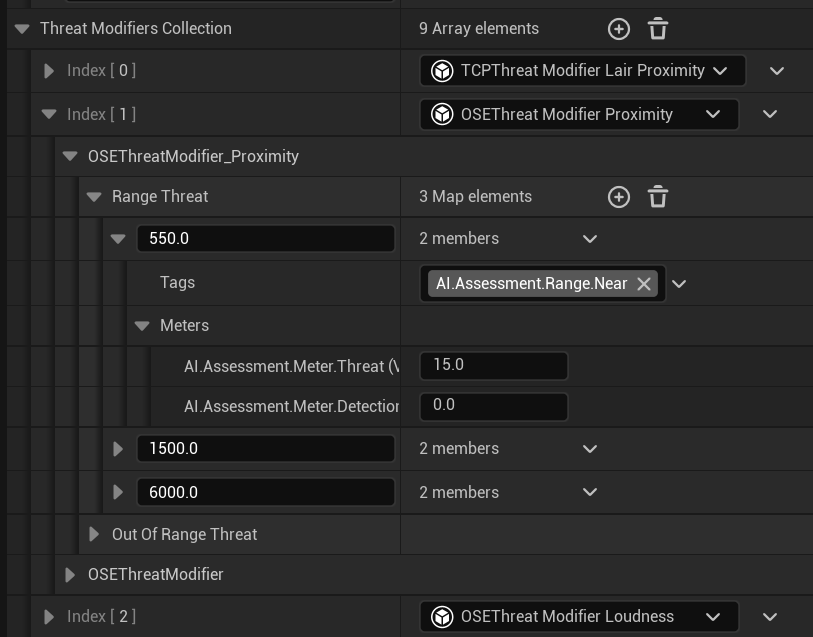
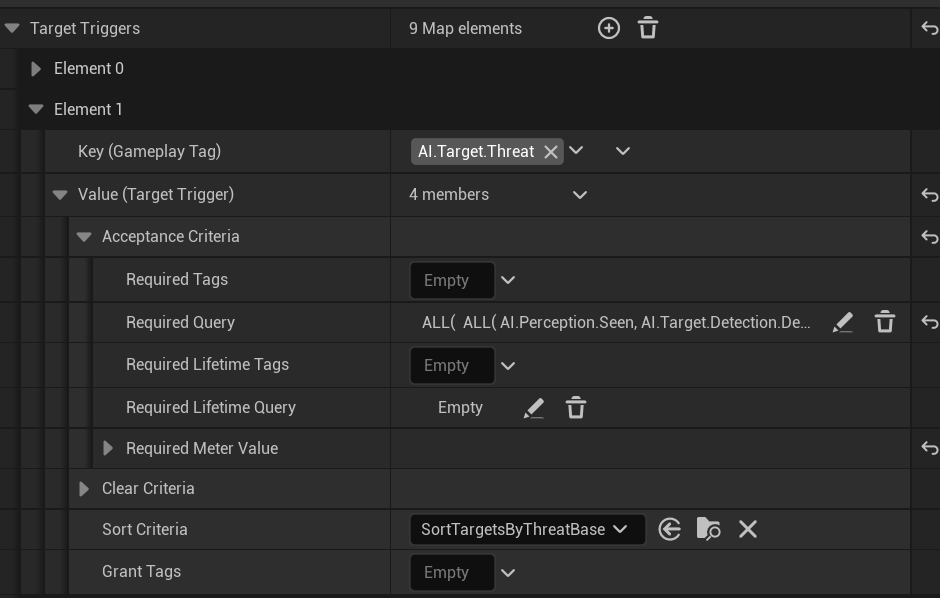
There are 4 parts to a threat assessment component. The meter, stimulus filter, modifier, and trigger. The meter is a bar with a value. Stimulus filter is amount of value to give to the meter when the perception component senses something. Modifier are custom ways to add value to the meter, and trigger is a delegate system that triggers when certain conditions are met (such as when the meter is at a specific value).
There was only one value for a meter that represents threat that can decay over time with triggers and ways to modify that meter. I was able to generalize this meter and customize the rate of growth or decay to use for stealth detection and any other future features that would require more detailed customization of a meter. This can be seen in the images on the right. I used DetailCustomization to auto populate the meters field for stimulus filter, modifiers, and triggers to more easily understand what value is being changed for what meter.
This was also later refactored into Data Assets to with Modifiers and Triggers being an array of assets to more easily be able to categorize the behaviors and track how the logic bounces off of each other. The meter and bools in the meter transferred to a global project setting to apply to all Agents to be able to define the type of meters that exist during the refactor.
This was also later refactored into Data Assets to with Modifiers and Triggers being an array of assets to more easily be able to categorize the behaviors and track how the logic bounces off of each other. The meter and bools in the meter transferred to a global project setting to apply to all Agents to be able to define the type of meters that exist during the refactor.
Replication
We later added in a visual to better understand how much an animal has sensed the player. I created an API endpoint/component on the player state that replicates data from the threat assessment for the UI to use. This defines the value and state for if the player has alerted the AI agent. The implementation utilzed a FastArray to be able to quickly handle all agents that the player has alerted as well as capped the updating to only replicate when there is a change in value or state.